





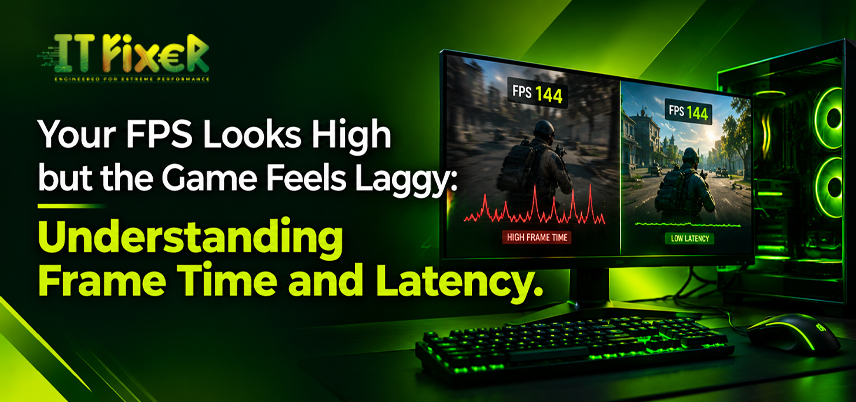
Your FPS Looks High but the Game Feels Laggy
A high FPS counter does not guarantee responsive gameplay. A game may display 160 FPS while aiming feels delayed due to inconsistent frame delivery, input latency or a hardware bottleneck. Diagnose the cause before upgrading.
Why high FPS can still feel uneven
Frame time measures how long each frame takes to render: 10 milliseconds at 100 FPS and 5 milliseconds at 200 FPS. Sudden increases can make movement look uneven despite high average FPS.
Check the frametime graph for spikes, micro-stuttering during turns and FPS fluctuations in demanding scenes. Low 1% and 0.1% lows can reveal inconsistencies hidden by average FPS.
Diagnose frame pacing before changing hardware
Shader compilation, asset loading and background processes can interrupt frame delivery. If a second run is smoother, initial shader compilation or asset loading may explain the stutter.
Replay the same section with unchanged graphics settings, close unnecessary applications and adjust one setting at a time. If you suspect a mouse or controller issue, test a known-working device.
When comparing gaming accessories in Chennai, consider whether a higher-refresh-rate monitor or a mouse with more consistent tracking suits your needs.
Separate input latency from rendering delay
System latency is the delay between an input and its on-screen response. Rendering, monitor processing and controller response can affect aiming.
Test NVIDIA Reflex or AMD Anti-Lag if supported. V-Sync may increase input delay, while G-Sync and FreeSync synchronise display updates through variable refresh rate technology. Check your monitor's refresh rate and mouse polling rate. If a peripheral seems responsible, test gaming accessories in Chennai with a known-working device.
Check CPU, GPU and memory behaviour
High GPU utilisation is normal in demanding games. High CPU load with relatively low GPU utilisation may indicate a processor bottleneck, while consistently high GPU utilisation can suggest a graphics limitation. Identify the cause before selecting gaming PC components in Chennai.
Insufficient RAM, limited VRAM and excessive temperatures can cause stuttering. Lower texture quality if VRAM is nearly full, and inspect the cooling system if temperatures suggest thermal throttling.
When a gaming PC upgrade in Chennai makes sense
Consider a gaming PC upgrade in Chennai when repeated tests reveal a limitation that settings changes cannot resolve. A targeted gaming PC upgrade in Chennai can fix the problem without replacing the entire system.
Plan a Gaming PC Upgrade in Chennai Based on the Bottleneck
A gaming PC upgrade in Chennai might involve adding RAM, replacing an ageing graphics card or moving a game to an SSD if storage causes pauses. Check motherboard support, CPU socket, PSU capacity and case clearance before buying parts.
Use Benchmark Results to Plan a Gaming PC Upgrade in Chennai
Use benchmark results to identify the limiting component and assess whether replacing it is worth the cost. Higher specifications do not guarantee better gameplay.
Choose gaming accessories in Chennai for responsive control
When choosing gaming accessories in Chennai, consider whether you need clearer motion or more consistent mouse control. A high-refresh-rate monitor can improve motion clarity, while a responsive mouse can improve input handling. Neither fixes a CPU bottleneck. Compare gaming accessories in Chennai by compatibility and intended use.
Check Compatibility When Buying Gaming Accessories in Chennai
Check refresh rates, connection types and device compatibility. Before buying gaming accessories in Chennai, review the warranty and return policy.
Which Gaming Accessories in Chennai Can Solve Your Problem?
A compatible variable-refresh-rate monitor can reduce screen tearing, but a new mouse will not fix uneven frame delivery. Choose gaming accessories in Chennai to address the specific issue.
Choose Gaming PC Components in Chennai Based on Performance Needs
Use benchmarks to select gaming PC components in Chennai that address the performance limitation. A faster graphics card may offer little benefit when the processor restricts frame rates.
Select gaming PC components in Chennai that fit the system
Check motherboard support, connectors, dimensions and cooling requirements. A gaming hardware store in Chennai can verify physical fit and connection compatibility.
How to Budget for Gaming PC Components in Chennai
Compare expected performance gains, prices and warranty coverage. Prioritise gaming PC components in Chennai that meet your needs without paying extra for unnecessary specifications.
When gaming PC upgrade services in Chennai can help
If the cause remains unclear, gaming PC upgrade services in Chennai should begin with utilisation checks, temperature monitoring and repeatable benchmarks to distinguish hardware issues from software or configuration problems.
What to Expect from Gaming PC Upgrade Services in Chennai
Professional gaming PC upgrade services in Chennai should explain the diagnosis, cost and expected benefits before recommending a replacement. A gaming hardware store in Chennai can check dimensions, and gaming PC components in Chennai should match the test results.
How to Compare Gaming PC Upgrade Services in Chennai
Choose a provider with transparent pricing and documented results. Ask gaming PC upgrade services in Chennai to record before-and-after performance.
What to ask at a gaming hardware store in Chennai
Bring your PC specifications and benchmark results to a gaming hardware store in Chennai to help staff identify compatible parts and performance limitations.
Compare options at a gaming hardware store in Chennai
Ask about warranty, returns and compatibility before buying. A gaming hardware store in Chennai should explain expected benefits without promising unverified FPS gains.
Make the next test useful
Use benchmark results to determine whether a gaming PC upgrade in Chennai is necessary and which component to prioritise.
If stuttering persists, gaming PC upgrade services in Chennai can diagnose the cause before you spend money. A gaming hardware store in Chennai can help you choose compatible replacement parts.
Record frametimes, compare average FPS with 1% and 0.1% lows, and change one setting at a time to identify improvements in frame consistency.
Your FPS looks high but the game feels laggy? Learn how frame time, input latency, and system performance affect smooth gameplay

IT FIXER
DLSS 5 Explained: What Does AI Neural Rendering Actually Change?
- OCTOBER 17, 2026
Upgrade or Replace Your Gaming PC? 7 Signs You Need a New Build
- OCTOBER 13, 2026
Gaming PC Overheating in Chennai? Causes, Fixes and Cooling Tips
- OCTOBER 10, 2026
Need Any Help
Call Us 24/7 Full Support
Leave a comments
Your email address will not be published. Required fields are marked *