





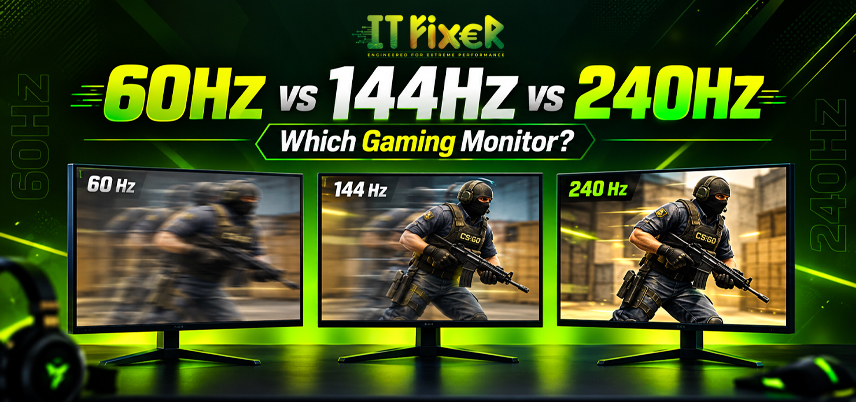
60Hz vs 144Hz vs 240Hz: Which Gaming Monitor Is Best?
Choosing a gaming monitor is about more than screen size and resolution. The monitor refresh rate determines how frequently the display updates an image, while FPS shows how many frames your gaming PC generates. A 60Hz display refreshes 60 times per second, whereas 144Hz and 240Hz displays are designed for much faster motion.
Your monitor’s refresh rate should match your PC’s FPS and gaming needs.
60Hz vs 144Hz vs 240Hz gaming monitor: Understanding the Refresh Rate
Refresh rate, measured in Hz, shows how many times a monitor updates the image per second: 60Hz, 144Hz, or 240Hz. Your choice should match your PC’s FPS and gaming needs.
60Hz vs 144Hz vs 240Hz gaming monitor: Where Does Each Level Fit?
60Hz suits casual and budget gaming, 144Hz offers a good balance for most PC gamers, and 240Hz is best for high-FPS esports.
60Hz Gaming: The Budget-Friendly Starting Point
60Hz suits casual gaming, AAA titles, consoles, and entry-level PCs. Its main drawback is less fluid motion during fast gameplay. It can also leave more budget for other PC components.
144Hz Gaming: The Balanced Performance Choice
144Hz provides smoother gameplay for FPS, racing, action, and competitive games, making it a good choice for mid-range gaming PCs.
The 60Hz vs 144Hz vs 240Hz gaming monitor decision often favors 144Hz when you want a balance between price, smooth gameplay, and hardware requirements.
Monitor response time also matters. A fast refresh rate paired with slow pixel transitions may reduce the expected benefit, so check response time and input lag alongside the advertised Hz.
240Hz Gaming: Built for High-FPS Players
240Hz suits competitive players with high-FPS systems. Check your CPU, GPU, resolution, and expected FPS before buying. Demanding AAA games may require much more GPU power to reach high frame rates.
Best PC Builder in Chennai: Match the Monitor to Your PC
A PC builder can help match your monitor to your GPU, CPU, resolution, and target FPS.
- Budget PC → 60Hz
- Mid-range PC → 144Hz or 165Hz
- High-performance PC → 240Hz
- Esports PC → 240Hz with high FPS
Best Gaming PC Store in Chennai: Choose the Right Display
A Gaming PC store in Chennai can help you compare monitors based on FPS, resolution, refresh rate, and adaptive sync. Choose 144Hz or 240Hz according to your games and PC performance.
Affordable Gaming PC Store in Chennai: Choose the Right Monitor
A Gaming PC Store in Chennai can help you choose a monitor based on your games, FPS, resolution, refresh rate, and adaptive sync. For competitive gaming, 144Hz or 240Hz can provide smoother motion, while AAA games may require a stronger GPU at higher resolutions.
Before buying, check:
- Resolution
- Expected FPS
- Response time
- Input lag
- Adaptive sync
- GPU compatibility
Choose 144Hz for a balanced gaming experience or 240Hz if your PC can consistently deliver high FPS.
Custom Gaming Computer Chennai: Build Around Your Target FPS
A custom gaming computer Chennai setup can be built around your target FPS by balancing the CPU, GPU, memory, cooling, PSU, and monitor. Competitive builds should prioritize high FPS, while AAA gaming may require more GPU power.
60Hz vs 144Hz vs 240Hz gaming monitor: What About Input Lag?
Refresh rate and input lag are related but different. Higher refresh rates reduce the time between screen updates, while input lag measures the delay between an input and its appearance on screen.
Approximate refresh intervals are:
- 60Hz: 16.67 ms
- 144Hz: 6.94 ms
- 240Hz: 4.17 ms
A 240Hz monitor does not automatically have lower total latency. Response time, processing, connection, and system performance also matter.
60Hz vs 144Hz vs 240Hz gaming monitor: Which Feels More Responsive?
The jump from 60Hz to 144Hz is generally more noticeable than 144Hz to 240Hz. For most players, 144Hz offers a strong balance of smoothness, responsiveness, hardware requirements, and cost, while 240Hz is better suited to competitive gamers with very high FPS.
Top PC Builder in Chennai: Consider FreeSync and G-Sync
A PC builder in Chennai can check monitor and GPU compatibility.
Before purchasing, check:
- Adaptive sync compatibility
- GPU support
- Connection options
- Variable refresh range
- Native resolution
- Response time
A PC builder in Chennai can help ensure the monitor and graphics card work together rather than treating each component as a separate purchase.
Gaming PC Store in Chennai: 144Hz or 240Hz?
A Gaming PC store in Chennai can compare 144Hz and 240Hz monitors based on your actual FPS. A PC builder in Chennai can recommend the right option for your PC.
- Choose 144Hz for mixed gaming, moderate-to-high FPS, and better value.
- Choose 240Hz for competitive gaming when your system can consistently deliver very high FPS.
A Gaming PC store in Chennai should also consider resolution because increasing resolution can increase GPU requirements.
One-Stop Gaming PC Store in Chennai: Monitor Buying Guide
A Gaming PC Store in Chennai can help you compare refresh rate, response time, resolution, and adaptive sync. Choose 144Hz or 240Hz based on your PC’s FPS and the games you play.
Custom Gaming Computer Chennai: Which Refresh Rate Fits Your Budget?
A custom gaming computer Chennai setup can be built around your target FPS. A PC builder in Chennai can match the CPU, GPU, and monitor to your games. For 144Hz, a mid-range GPU may be enough, while 240Hz esports gaming may need stronger hardware.
Final Verdict
The 60Hz vs 144Hz vs 240Hz gaming monitor choice should match your games, FPS, and hardware. Refresh rate, response time, resolution, input lag, and adaptive sync all affect the experience.
A PC builder in Chennai or Gaming PC store in Chennai can help match your monitor to your hardware. A custom gaming computer Chennai setup is useful when you want to build around a specific FPS target.
For casual users, 60Hz is still sufficient. For most PC gamers, 144Hz offers an excellent combination of smooth gameplay and value. For competitive players with high-performance hardware, 240Hz is the specialized choice.
Compare 60Hz, 144Hz, and 240Hz gaming monitors to find the right refresh rate for your FPS, hardware, and gaming style.

IT FIXER
Need Any Help
Call Us 24/7 Full Support
Leave a comments
Your email address will not be published. Required fields are marked *