





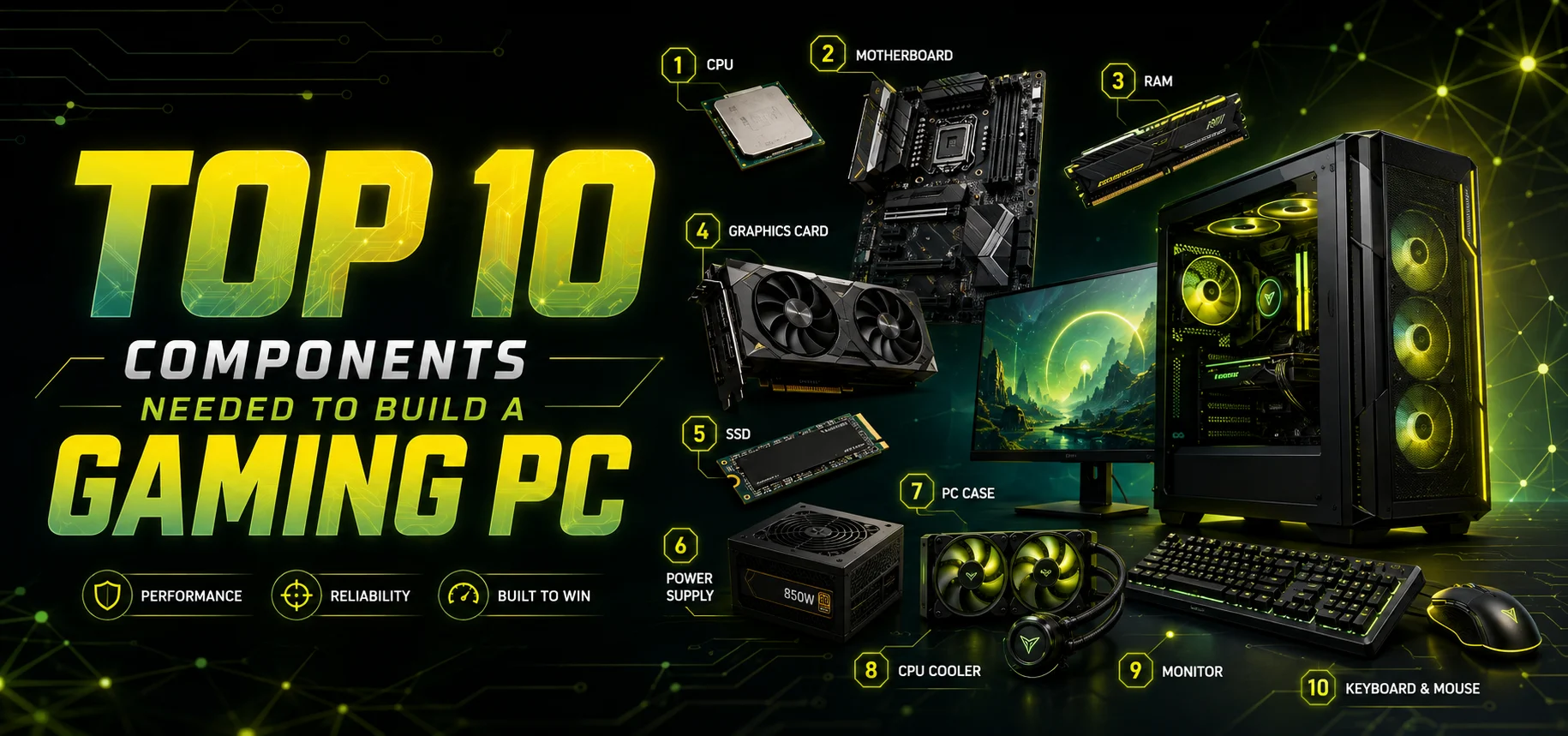
Top 10 Components Needed to Build a Gaming PC
Building your own gaming PC has become increasingly popular among gamers, creators, and professionals in India. Instead of buying a pre-built system, many users now prefer a custom-built computer that perfectly fits their performance needs and budget. One of the biggest advantages of custom PC builds is the flexibility it offers. You can choose powerful components, upgrade whenever needed, and create a system that delivers maximum gaming performance.
Whether you are planning to play modern AAA games, stream online, edit videos, or even look for the best desktop for office use in India, understanding the key components of a gaming PC is extremely important. Each component works together to deliver smooth performance, better graphics, and faster processing.
The Brain of Your Gaming PC
The Central Processing Unit (CPU) is one of the most important components in a gaming PC. It acts as the brain of the system, handling all calculations, instructions, and processes that allow your computer to function. For gaming PCs, choosing a powerful processor ensures that your system can handle modern games, multitasking, and background applications like streaming software. Games today rely heavily on multi-core processors, so choosing CPUs with higher cores and threads is recommended.
Popular gaming processors include the Intel Core i5,and i7,and the AMD Ryzen 5 or Ryzen 7. These processors deliver excellent performance for gaming, editing, and even productivity tasks. One of the major advantages of custom PC builds is that you can select the exact processor that suits your gaming style and budget.
The Heart of Gaming Performance
The graphics processing unit (GPU) is arguably the most crucial component for gaming. It is responsible for rendering graphics, textures, lighting effects, and overall visual quality in games. Modern gaming titles require powerful GPUs to deliver high frame rates and smooth gameplay. A dedicated graphics card significantly improves gaming performance compared to integrated graphics.
High-performance GPUs allow gamers to enjoy features like the following:
Ultra-high- resolution gaming
- Ray tracing technology
- Smooth frame rates
- Enhanced visual effects
The Backbone of Your System
The motherboard is the central circuit board that connects all the components of your gaming PC. Every part of your system including the CPU, GPU, RAM, storage, and cooling, communicates through the motherboard. Choosing the right motherboard ensures compatibility and future upgrade options.
Important factors to consider include:
- CPU socket compatibility
- RAM support
- Expansion slots
- Storage ports
- Connectivity options
A good motherboard allows you to expand your system later, which is one of the biggest advantages of custom PC builds. Instead of replacing your entire system, you can simply upgrade specific components. For professionals who need reliable performance, a well-configured system can even serve as the best desktop for office use in India, supporting business software, multitasking, and productivity tools.
Ensuring Smooth Multitasking
Random Access Memory (RAM) plays a critical role in system performance. It temporarily stores data that your computer needs quick access to while running applications and games. For gaming PCs, at least 16GB RAM is recommended for smooth performance. High-end gaming setups may even use 32GB RAM for streaming, editing, and multitasking.
More RAM allows your system to:
- Load games faster
- Run multiple programs smoothly
- Reduce lag during gameplay
- Improve system responsiveness
Storage (SSD or HDD)
Storage determines how fast your system loads games, applications, and files. There are two main types of storage devices used in gaming PCs: Solid State Drives (SSDs) and Hard Disk Drives (HDDs).
SSDs are significantly faster and are now widely recommended for gaming systems. They reduce game loading times, improve system boot speed, and provide a smoother overall experience.
Many gamers use a combination of both storage types:
- SSD for operating system and games
- HDD for large files and backups
Supplying Stable Power
The Power Supply Unit (PSU) converts electricity from your wall outlet into usable power for your computer components. A reliable PSU ensures stable performance and protects your system from power fluctuations. Gaming PCs with powerful GPUs and processors require higher-wattage power supplies. Choosing a certified PSU ensures efficiency and long-term stability.
A good PSU provides:
- Stable voltage supply
- Protection from power surges
- Improved system reliability
When building a gaming system, selecting the correct PSU is essential to ensure safe and efficient operation.
Preventing Overheating
Gaming PCs generate significant heat due to high-performance components. Without proper cooling, overheating can reduce performance and damage hardware.
There are two main types of cooling solutions:
Air Cooling – Uses fans and heatsinks to dissipate heat.
Liquid Cooling – Uses liquid coolant for advanced heat management.
Cooling systems help maintain optimal temperatures, ensuring smooth gameplay even during long gaming sessions.
Protecting Your Components
The PC cabinet, also known as the case, houses all the components of your gaming system. It protects the hardware while allowing proper airflow and cable management.
Modern gaming cabinets are designed with:
- RGB lighting
- Tempered glass panels
- Advanced airflow systems
- Cable management options
Choosing the right cabinet improves both aesthetics and functionality.
Many gamers prefer stylish cases that showcase their hardware, adding a premium look to their gaming setup.
Experience the Visual Power
A powerful gaming PC deserves a high-quality monitor. The monitor determines how clearly and smoothly you see your games. Important factors when choosing a gaming monitor include:
- Refresh rate (144Hz or higher recommended)
- Response time
- Resolution (1080p, 1440p, or 4K)
- Panel type
A high refresh rate monitor ensures smooth gameplay, especially in fast-paced games like FPS or racing titles.
Gaming Peripherals – Keyboard, Mouse, and Headset
Gaming peripherals complete your gaming experience. High-quality accessories improve accuracy, comfort, and overall gameplay.
Important gaming peripherals include:
- Mechanical gaming keyboard
- High DPI gaming mouse
- Surround sound gaming headset
Professional gamers often invest in premium peripherals for better control and immersive gameplay. A custom gaming setup ensures every part of the system from hardware to accessories works together perfectly.
Advantages of Custom PC Builds
Many gamers today prefer building their own computers instead of buying pre-built systems. There are several advantages of custom PC builds that make them the preferred choice.
First, custom PCs allow complete control over hardware selection. Users can choose high-performance components suited to their gaming or professional needs.
Second, custom PCs offer better upgrade flexibility. Instead of replacing the entire system, users can upgrade individual components such as RAM, GPU, or storage. Third, custom systems often provide better performance for the same budget compared to pre-built machines.
Finally, a well-built system can serve multiple purposes. A powerful gaming computer can also function as the best desktop for office use in India, handling productivity software, design tools, and multitasking efficiently.
How a Gaming PC Can Also Be the Best Desktop for Office Use India
Many people assume gaming PCs are only meant for entertainment. However, the truth is that gaming systems are powerful enough to handle professional workloads as well.
A gaming PC can easily run office applications, video conferencing tools, design software, and data processing programs.
Conclusion
Building a gaming PC is an exciting experience that allows you to create a system perfectly suited to your needs. By carefully selecting the right components such as CPU, GPU, motherboard, RAM, storage, cooling, and peripherals, you can build a powerful gaming machine capable of handling modern games and professional tasks.
One of the biggest advantages of custom PC builds is flexibility. You can customize your system according to your budget, upgrade components whenever necessary, and achieve better performance compared to pre-built systems.
Discover the top 10 essential components needed to build a gaming PC. A complete beginner guide to choosing the right parts for maximum performance.

IT FIXER
How to Choose a Graphics Card for Gaming: Complete Guide
- SEPTEMBER 12, 2026
60Hz vs 144Hz vs 240Hz: Which Gaming Monitor Is Best?
- SEPTEMBER 10, 2026
1080p vs 1440p Gaming: Which Is Better?
- SEPTEMBER 5, 2026
Need Any Help
Call Us 24/7 Full Support
Leave a comments
Your email address will not be published. Required fields are marked *